Content Marketing For Real Estate Case Study

Joel Conner • November 1, 2021

A different approach to marketing for realtors

It all started with an idea. After a lengthy conversation with a realtor-client of mine, we both agreed that we didn't like the typical real estate, marketing model. It is all very invasive. Disruptive ads on social media that lead to a frustrating forced lead capture are a far cry from a good user experience. Do realtors really want to introduce themselves to potential clients in such a way? And after the lead is "captured," now some poor agent is calling them "out of blue" on the phone. 

Agent-

"Oh, hi Mary... I saw that you were looking at 123 Lake Looky Drive... Would you like to set up a viewing?"

Mary-

"No, You Pesky Real Estate Agent! I am not looking to buy a home right now, I just wanted to see that beautiful home that popped up on Facebook. Please do not call me ever again!" Click.


The agent then clicks into the CRM and disqualifies the "prospect."


So you see how this whole setup is a bit uncomfortable. Forcing someone to give you their contact information is never the ideal way to start a relationship. Can you imagine a romantic relationship starting that way? 

"Hi there pretty thing, give me your phone number and I'll show you my investment portfolio."


The current method of casting a wide net and going after any potential home buyer that has a pulse, is targeting the very top of the marketing funnel. 

It can be effective. It takes a lot of work to follow up. And as noted before can be a poor way to introduce yourself to new clients. But what if you could target people who were much further down the funnel instead. Well, the good news is, you can. 

How to target the right real estate prospect with relevant content 

It's not that complicated. If you want to "skip to the front of the line," and target those who are ready or almost ready to take action there is a better way. 

Target those looking for realtors and design your website to foster trust

Now I know that this is not a new concept, but in most cases, realtors are only approaching this target with advertising dollars. And because this target, "Realtor in Fill in the Blank," is coveted, it's a very expensive keyword to go after with paid advertisements. How expensive depends on the competitors in your area. But you can be paying $10+ just for clicks, and those are not even "leads." 


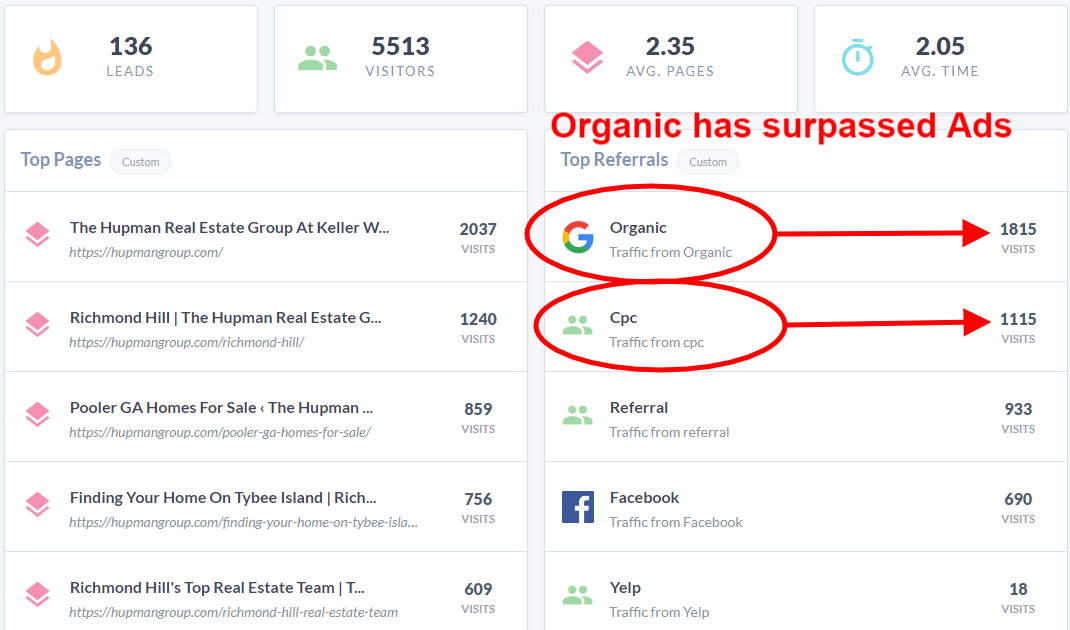
What if you could have more of those who were looking for realtors find you organically? You can! Is it easy? No. We did it in a relatively short amount of time. I am not going to lay out the whole strategy, I'll do that in another post, but I'll give you the proof. 


Instead of sending the signals to search engines that our site was about searching for homes (top of the funnel), we sent the signal that our website was about the top/best real estate group/team in town. We did this with the site description, h1 tags, homepage content, subpages, team pages, reviews pages, and so on.  We also created videos around this content, ranked them on YouTube, and embedded them on the web pages.

The result of using content marketing to target those searching for realtors

These statistics are pretty amazing in my opinion, especially when you factor in the top-tier quality of a lead that voluntarily reaches out to contact you after landing on your website, reading reviews, or watching a video. The worth of these leads is highlighted by how much real estate groups are willing to pay for them.


Case Study: Realtor Pages Results


Google Maps Results
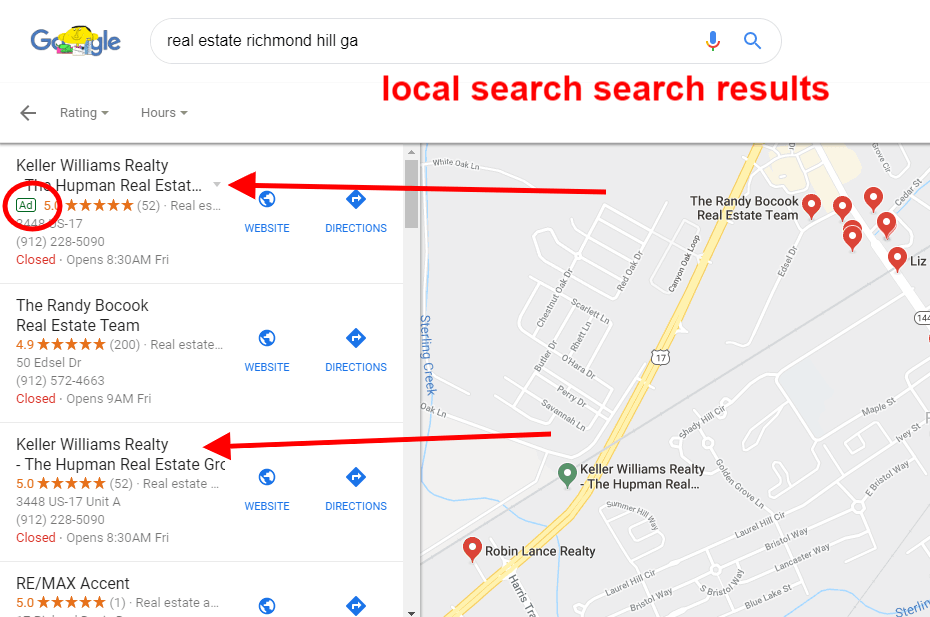
Google Maps Local Results

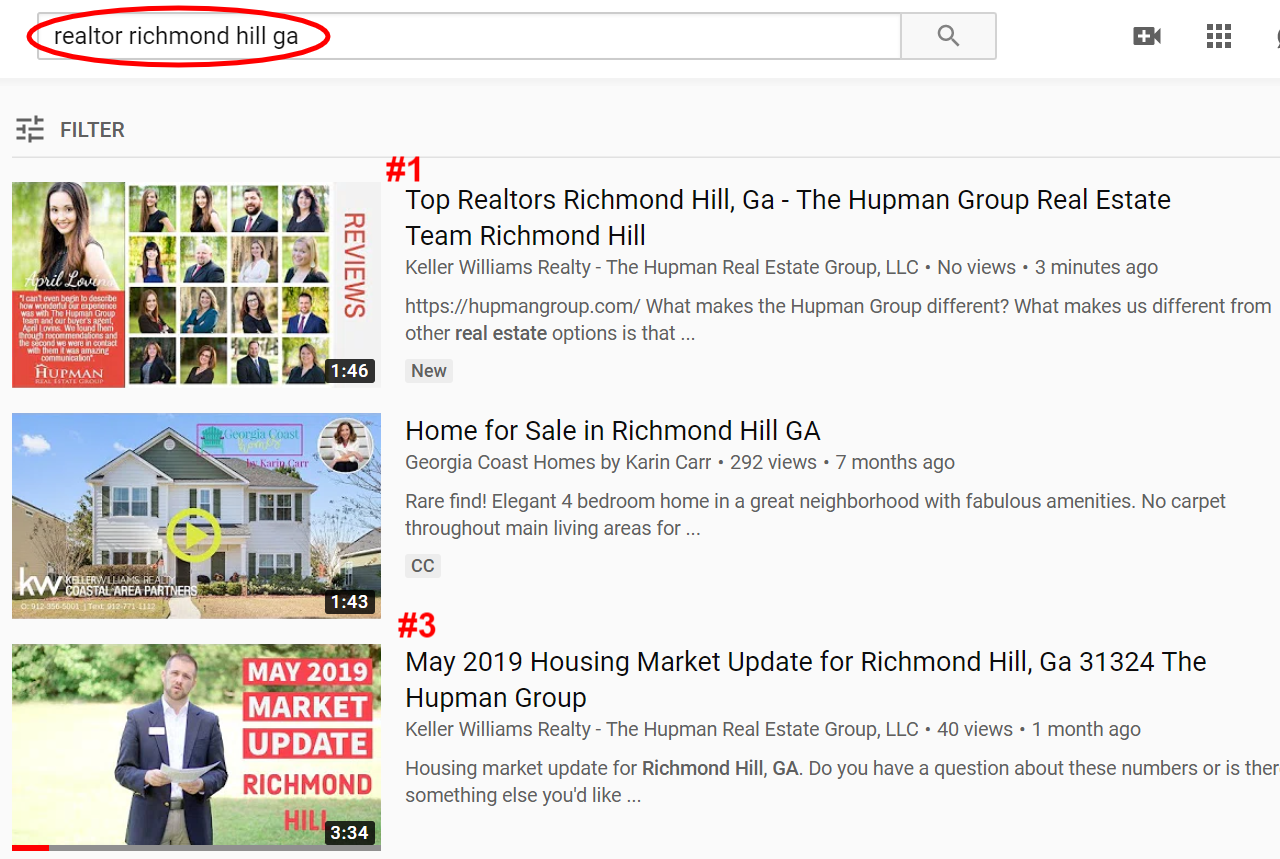
YouTube Results

YouTube results screenshot Richmond Hill Realtors

Side note: The are some large aggregator websites are also targeting these terms. Don't let them deter you. They don't show on google maps. You also have an advantage as being a local business. And many folks will scroll past those web pages, recognizing that they don't deliver what they are searching for.


Side note 2: Currently google reviews play a huge role in establishing trust for new potential clients & boosting your placement on Google map placement. Google and others trust these reviews because they are difficult to fake. So, don't neglect to ask for reviews, in fact, build it into your processes.


To learn more about the strategy for targeting the bottom of the marketing funnel for realtors read this article: Content Marketing for Realtors.


Target People Who Are Doing Serious Research About Neighborhoods

This group is not going to be as far down the funnel as targeting those looking for a realtor, but they are much farther along than those just browsing homes. 

People who get into "research mode" are more serious than casual Zillow browsers. They are looking for insights about the absolute "best fit" home for their family. They are going to want to know about neighborhoods or areas that are safe, close to good schools, near parks, easy commutes to work, and a myriad of other factors. The most helpful webpage that provides all of this is likely to rank well on Google. 


Once you have this helpful information, turn it into a video that you place at the top of the page. Don't just put all this neighborhood info on one page. Create pages for each neighborhood and link to them from one master neighborhood page. If it is a small to medium-sized city you can have one main neighborhood page. If it is a large city you may want to create a master page for multiple areas.


Neighborhoods within an area can link to each other via internal links, as it makes sense. This will reinforce the relevancy of the master page.


So, enough about the concepts, let's look at some results.


Neighborhood Pages Results
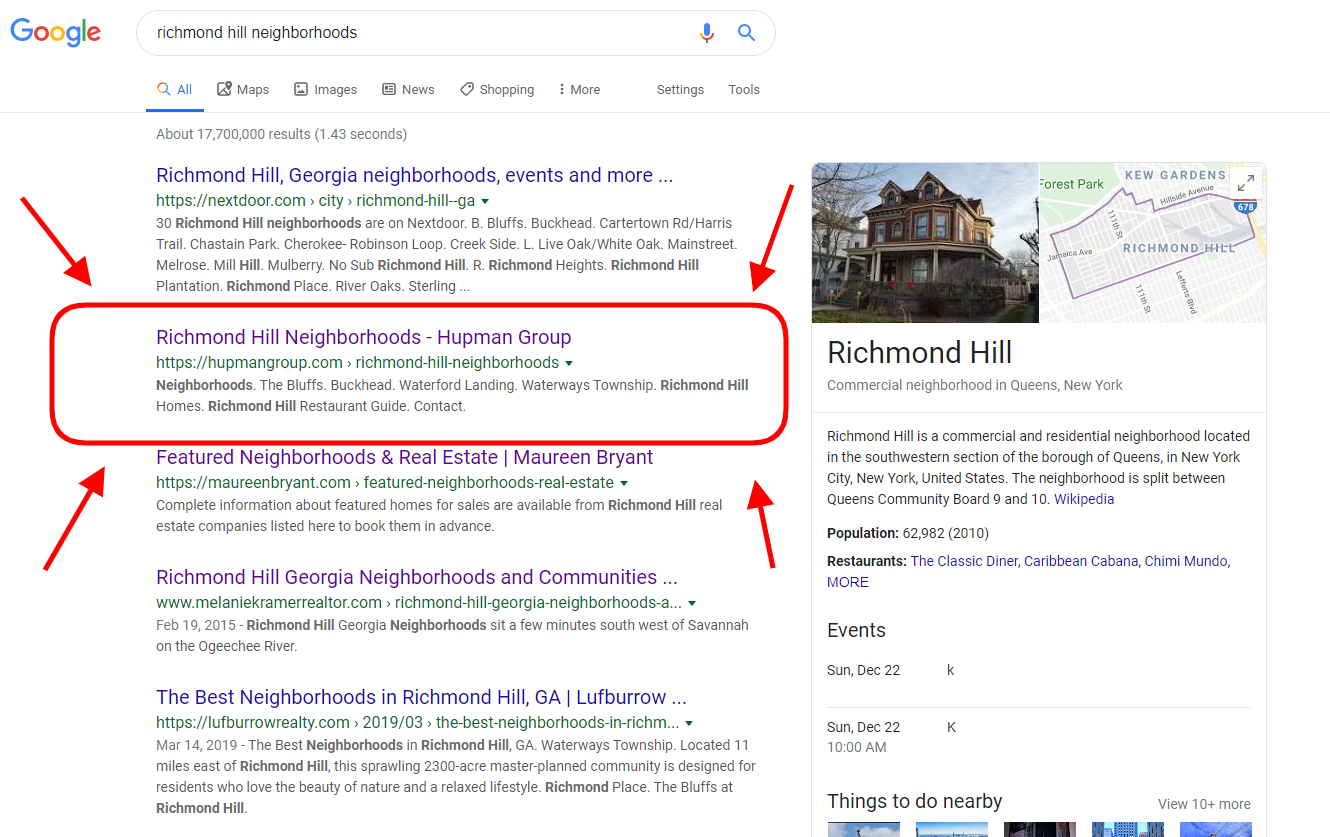

Search Results Richmond Hill Neighborhoods

Content Marketing for Real Estate Case Study Summary

As you can see, strategically creating relevant content around potential home buyers that are close to taking action is highly effective. It works wonderfully when executed properly. There is an important consideration. Is it easy to do? Is it easy for a busy real estate agent to do? No, and no. Is it possible? Yes. Is it likely to happen? No. 


So this is where we come in. Not only do we have the documented experience, but the team, the process, and the software to achieve the quickest possible results. Hiring a content marketing agency is an investment, however, it is likely one of the best investments your company may ever choose to make. Results don't happen overnight, but for those who stick with it, the ROI is a flood of website traffic and visibility that never gets turned off. 


There are many considerations, such as your starting point (your current domain authority and website visibility) and the levels of competitiveness in your area, but we have seen these strategies pay off in the most competitive markets. If you're interested, let us start a conversation. We are not pushy salespeople, we are just passionate about content marketing. 


Take The Next Step

Share

By Blue Swing Media Team April 22, 2026
Discover proven strategies for real estate agents to optimize their content and websites for AI search platforms like ChatGPT, Claude, and Perplexity. Learn how to dominate AI-powered search results and attract more qualified leads in 2026.
By Joel Conner April 7, 2026
A lot has changed since I published Digital Marketing with Tortoise & Hare in 2017. Back then, the digital marketing conversation was heavily centered on websites, search rankings, social media consistency, and building momentum over time. Those principles still matter, but the landscape has shifted in a big way. Even the way people discover businesses and consume information has changed. My book was published on June 12, 2017, and in many ways, that feels like a different era of digital marketing. One of the newer terms getting a lot of attention right now is GEO , which stands for Generative Engine Optimization . If you’ve been hearing people throw that term around and wondering whether it’s just another buzzword, you’re not alone. But there is something real behind it, and it’s worth understanding. So, What Is GEO? GEO is essentially the practice of optimizing your business, website, and content so that AI-driven search experiences can find, understand, trust, and reference you. Traditional SEO has focused on helping your website rank in search engine results. GEO is more about helping your brand show up in AI-generated answers , summaries, recommendations, and citations. In simple terms: SEO helps you rank. GEO helps you get referenced. That’s a meaningful distinction. Today, people are no longer just typing a keyword into Google and clicking through ten blue links. More and more, they are asking full questions and receiving summarized answers from AI tools. That means your content is not only competing for rankings anymore. It is also competing to become part of the answer itself. Has SEO Been Replaced? No. Let me say that clearly: GEO does not replace SEO. It builds on it. If your website is poorly structured, your content is thin, your service pages are weak, and your business has little authority online, then GEO is not going to magically fix that. The same foundational principles still matter: a technically sound website strong service and location pages clear messaging helpful content consistent brand signals trust and authority In other words, the tortoise still matters. Steady, strategic digital marketing still wins over hype, shortcuts, and shiny-object syndrome. That hasn’t changed. What has changed is that now your content needs to be useful not just for human readers and search crawlers, but also for AI systems trying to summarize the web. Why GEO Matters If AI-powered search experiences continue to grow, businesses that are easiest to understand and trust will have an advantage. That means the question is no longer just: “How do I rank for this keyword?” It’s also: “How do I become the kind of source that AI tools want to cite, summarize, and recommend?” That changes the strategy. Businesses that win in this next phase will likely have content that is: clear direct well-structured specific trustworthy supported by real-world authority The businesses that struggle will often be the ones still publishing vague, bloated, keyword-stuffed content that says a lot without really answering anything.
By Joel Conner March 22, 2026
Most People Think They Understand AI Search. They Don’t. And that misunderstanding is exactly why they’re not showing up in: Perplexity Google AI Overviews (Gemini) ChatGPT web results Let’s break something open that most churches and ministries haven’t realized yet. The Assumption That’s Costing You Visibility You search for: “churches near me” You check Google. You see the top results—maybe even your church is listed. So logically… 👉 Those should be the churches AI recommends, right? Wrong. The Strange Reality of AI Search In many cases, AI-generated answers (especially in Google AI Overviews or Perplexity) recommend churches that: Aren’t at the very top of Google Sometimes aren’t even the most obvious local options At first glance, it feels random. It’s not. It’s a pattern. “Wait… Doesn’t Local SEO Still Matter?” Yes. It absolutely does. Showing up in Google Maps, having reviews, and optimizing your website are still critical foundations . But here’s the shift most churches don’t see: 👉 Your keyword is just the starting point. Not the final query. What AI Is Actually Doing Behind the Scenes AI doesn’t just take “churches near me” at face value. It reinterprets the intent. Inside tools like Google’s Gemini, if you dig a little deeper, you’ll notice something like this: “The user wants a church… but what kind? Maybe they want a family-friendly church… or a Bible-based church… or something with kids programs… I should search for: family-friendly churches near me with kids ministry” 💥 That’s the turning point. Why Your Church Isn’t Showing Up Here’s what happens next: AI rewrites the query It searches using its version of the intent It pulls churches that match that refined query So now… 👉 The churches being recommended are NOT just optimized for “churches near me.” They’re aligned with something like: “family-friendly church near me” “church with strong kids ministry near me” “non-denominational church with modern worship near me” Proof in Action If you take one of those rewritten queries, like: “family-friendly church near me with kids ministry” …and search it yourself… You’ll often see: 👉 The same churches AI is recommending. This pattern shows up across: Gemini (Google AI Overviews) ChatGPT search Perplexity And it’s consistent. The Hard Truth No One Is Talking About Let’s be clear: ❌ Your church isn’t being ignored ❌ SEO isn’t broken 👉 You’re losing interpretation battles. The New Game: AI Search for Churches If you want your church to show up in AI-driven results, here’s what actually works: 1. Start with the Core Search Think: “churches near me” “church in [your city]” 2. Identify How AI Expands It Ask: What kind of church is someone looking for? What concerns or needs might they have? Examples: Families with kids Young adults Spanish-speaking communities Bible-teaching focus 3. Discover the Rewritten Queries These might look like: “family-friendly church in [city]” “Christian church with youth group near me” “church with Spanish service near me” “small church with strong community near me” 4. Create Content That Matches Not just a generic homepage. But pages or sections that clearly communicate: Kids ministry Youth programs Worship style Beliefs Community life 5. Align With How AI Thinks When your church clearly answers those deeper needs… 👉 AI starts including you in its recommendations. This Isn’t About Doing More. It’s About Being Clearer. You don’t need: More complicated SEO strategies More technical tricks You need: 👉 Clear alignment with real human intent—through the lens of AI. Final Thought AI search is changing how people find a church. They’re not just searching… 👉 They’re asking. And AI is answering based on interpreted needs , not just keywords. The churches that will grow in this new landscape aren’t just visible. They’re understood.