Content Marketing for Landscape Companies Case Study

Joel Conner • November 12, 2021

Introduction: A new way to think about growing your landscaping business 


How to target landscaping clients by creating relevant content 

It's not that complicated. If you want to "skip to the front of the line," and target those who are ready or almost ready to take action there is a better way. 


Create helpful web pages for those searching for landscaping and lawn services and design your web pages to build trust

Now I know that this is not a new concept, but in most cases, landscaping companies are only approaching this target with advertising dollars. And because this target, "Landscaping services in MyTown," is coveted, it's an expensive keyword to go after with paid advertisements. How expensive depends on the competitors in your area.  Their are many marketing strategies for landscaping businesses, but we believe that content market builds more trust and organically grow (no pun intended) your business.


What if you could have more of those who were looking for landscaping companies find you organically? It is doable! But it doesn’t happen overnight and without the right game plan. We were able to do it in a matter of a few months. I am not going to go through all the details, I’ve already provided that in the local content marketing pages of our website, but I would like to get you excited by showing you some compelling stats. 


We started sending the right blend of signals to web crawlers that our website was about the top/best landscaping services in the area. We did this all over our website using the website description, h1 metatags, information on the main page, supporting pages, the “about us” page, and blog posts. We created custom video content around the web pages, posted the videos on YouTube, optimized them to perform well, and then put those videos on the website via I-frame.


The result of using content marketing to target those searching for landscaping companies


The statistics in this case study are pretty amazing in my opinion, especially when you factor in the quality of a prospect that takes action to get in touch with you after finding your content, learning about landscaping, reading your testimonials, or watching or of your videos. The value of these leads is made clear by how much local landscaping companies are willing to bid for them in a Google Ads Campaign.


Google My Business Results
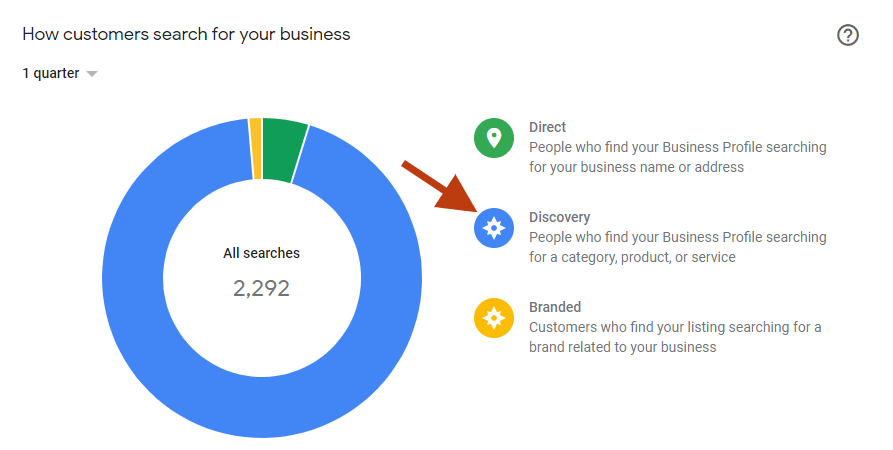
The image above shows the visibility of a local landscaping company in a small town in Florida that hired us to do local content marketing for them.  Notice that the larges percentage by far (in blue) is discovery!


Sidenote: The are some large services aggregator websites are also targeting these terms. Don't let them deter you. They don't show on google maps. You also have an advantage as being a local business. And many folks will scroll past those web pages, recognizing that they don't deliver what they are searching for.


Sidenote 2: Currently google reviews make big difference in building authority for new prospects & elevating your presence on Google maps. Search engines and users rely on verified testimonials because they are hard to manipulate. So, don't forget to ask your fans for testimonials, so make it a part of your business plan.


Target People Who Are Doing Serious Research About landscaping tips

This group isn't as zeroed-in as those searching for a landscaper, but they are much more targeted than those just scrolling on social media feeds. 

People who are in the "research phase" are more intentional than casual YouTube browsers. They are looking for insights about the absolute "best fit" home for their lawn and garden. They are going to want to know about landscaping tips specific to their geographic area, best hedges, hardiest flowers, and a myriad of other factors. The most helpful webpage that provides all of these localized landscaping tips is likely to perform well on Google. And in most cases, the competition is going to be willing to do this.


Once you have this helpful information, turn it into a video that you place at the top of the page. Don't just put all this landscaping tips info on one page. Create pages for each landscaping tip and link to them from one master landscaping tips page. If it is a small to a medium-sized city you can have one main landscaping tips page. If it is a large city you may want to create a master page for multiple areas.


Landscaping tips within an area can link to each other via internal links, as it makes sense. This internal linking will boost the authority of the main root page.


So, enough about the concepts, let's look at some results.


Landscaping Tips Pages Results
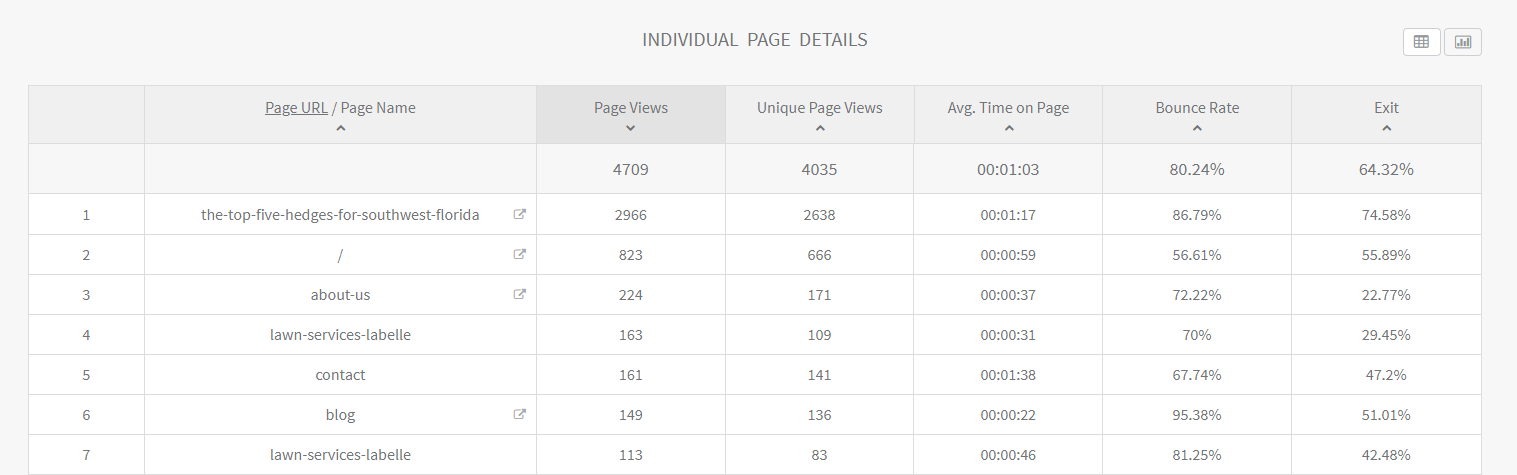
content pages for landscaping

Notice that the number one page on the website is a content related page with almost 3,000 views.


Case Study Summary: Content Marketing for Landscaping Companies 

As you can see, strategically creating relevant content around potential home buyers that are close to taking action is highly effective. It is a game-changer when done correctly. 


Disclaimer:

Is this something that is doable? Is it an easy feat for a busy landscaping company owner to accomplish? I'm sorry to say it is not. Is it a possibility? Yes. Is it likely to happen? No. 


So this is where content marketing agencies can help. We have the team, experience, processes, and tools to accomplish the fastest ROI. Hiring a team like ours is an investment. It is one of the best moves your company may ever choose to make. Results won't happen instantaneously, but for those who stick with it, the result (when properly executed) is website traffic and findability that stays on 24-7. 


There are many factors involved, such as domain authority, your local presence, the quality of your content, and the competition in your city, but we have seen content marketing work well in highly competitive areas. If you're curious about how this could play out for you, let us get acquainted. This strategy is highly effective and would love to implement a content marketing campaign to help your landscaping business thrive. 


Ready to Get Started?

Take the next step...

Share

By Blue Swing Media Team April 22, 2026
Discover proven strategies for real estate agents to optimize their content and websites for AI search platforms like ChatGPT, Claude, and Perplexity. Learn how to dominate AI-powered search results and attract more qualified leads in 2026.
By Joel Conner April 7, 2026
A lot has changed since I published Digital Marketing with Tortoise & Hare in 2017. Back then, the digital marketing conversation was heavily centered on websites, search rankings, social media consistency, and building momentum over time. Those principles still matter, but the landscape has shifted in a big way. Even the way people discover businesses and consume information has changed. My book was published on June 12, 2017, and in many ways, that feels like a different era of digital marketing. One of the newer terms getting a lot of attention right now is GEO , which stands for Generative Engine Optimization . If you’ve been hearing people throw that term around and wondering whether it’s just another buzzword, you’re not alone. But there is something real behind it, and it’s worth understanding. So, What Is GEO? GEO is essentially the practice of optimizing your business, website, and content so that AI-driven search experiences can find, understand, trust, and reference you. Traditional SEO has focused on helping your website rank in search engine results. GEO is more about helping your brand show up in AI-generated answers , summaries, recommendations, and citations. In simple terms: SEO helps you rank. GEO helps you get referenced. That’s a meaningful distinction. Today, people are no longer just typing a keyword into Google and clicking through ten blue links. More and more, they are asking full questions and receiving summarized answers from AI tools. That means your content is not only competing for rankings anymore. It is also competing to become part of the answer itself. Has SEO Been Replaced? No. Let me say that clearly: GEO does not replace SEO. It builds on it. If your website is poorly structured, your content is thin, your service pages are weak, and your business has little authority online, then GEO is not going to magically fix that. The same foundational principles still matter: a technically sound website strong service and location pages clear messaging helpful content consistent brand signals trust and authority In other words, the tortoise still matters. Steady, strategic digital marketing still wins over hype, shortcuts, and shiny-object syndrome. That hasn’t changed. What has changed is that now your content needs to be useful not just for human readers and search crawlers, but also for AI systems trying to summarize the web. Why GEO Matters If AI-powered search experiences continue to grow, businesses that are easiest to understand and trust will have an advantage. That means the question is no longer just: “How do I rank for this keyword?” It’s also: “How do I become the kind of source that AI tools want to cite, summarize, and recommend?” That changes the strategy. Businesses that win in this next phase will likely have content that is: clear direct well-structured specific trustworthy supported by real-world authority The businesses that struggle will often be the ones still publishing vague, bloated, keyword-stuffed content that says a lot without really answering anything.
By Joel Conner March 22, 2026
Most People Think They Understand AI Search. They Don’t. And that misunderstanding is exactly why they’re not showing up in: Perplexity Google AI Overviews (Gemini) ChatGPT web results Let’s break something open that most churches and ministries haven’t realized yet. The Assumption That’s Costing You Visibility You search for: “churches near me” You check Google. You see the top results—maybe even your church is listed. So logically… πŸ‘‰ Those should be the churches AI recommends, right? Wrong. The Strange Reality of AI Search In many cases, AI-generated answers (especially in Google AI Overviews or Perplexity) recommend churches that: Aren’t at the very top of Google Sometimes aren’t even the most obvious local options At first glance, it feels random. It’s not. It’s a pattern. “Wait… Doesn’t Local SEO Still Matter?” Yes. It absolutely does. Showing up in Google Maps, having reviews, and optimizing your website are still critical foundations . But here’s the shift most churches don’t see: πŸ‘‰ Your keyword is just the starting point. Not the final query. What AI Is Actually Doing Behind the Scenes AI doesn’t just take “churches near me” at face value. It reinterprets the intent. Inside tools like Google’s Gemini, if you dig a little deeper, you’ll notice something like this: “The user wants a church… but what kind? Maybe they want a family-friendly church… or a Bible-based church… or something with kids programs… I should search for: family-friendly churches near me with kids ministry” πŸ’₯ That’s the turning point. Why Your Church Isn’t Showing Up Here’s what happens next: AI rewrites the query It searches using its version of the intent It pulls churches that match that refined query So now… πŸ‘‰ The churches being recommended are NOT just optimized for “churches near me.” They’re aligned with something like: “family-friendly church near me” “church with strong kids ministry near me” “non-denominational church with modern worship near me” Proof in Action If you take one of those rewritten queries, like: “family-friendly church near me with kids ministry” …and search it yourself… You’ll often see: πŸ‘‰ The same churches AI is recommending. This pattern shows up across: Gemini (Google AI Overviews) ChatGPT search Perplexity And it’s consistent. The Hard Truth No One Is Talking About Let’s be clear: ❌ Your church isn’t being ignored ❌ SEO isn’t broken πŸ‘‰ You’re losing interpretation battles. The New Game: AI Search for Churches If you want your church to show up in AI-driven results, here’s what actually works: 1. Start with the Core Search Think: “churches near me” “church in [your city]” 2. Identify How AI Expands It Ask: What kind of church is someone looking for? What concerns or needs might they have? Examples: Families with kids Young adults Spanish-speaking communities Bible-teaching focus 3. Discover the Rewritten Queries These might look like: “family-friendly church in [city]” “Christian church with youth group near me” “church with Spanish service near me” “small church with strong community near me” 4. Create Content That Matches Not just a generic homepage. But pages or sections that clearly communicate: Kids ministry Youth programs Worship style Beliefs Community life 5. Align With How AI Thinks When your church clearly answers those deeper needs… πŸ‘‰ AI starts including you in its recommendations. This Isn’t About Doing More. It’s About Being Clearer. You don’t need: More complicated SEO strategies More technical tricks You need: πŸ‘‰ Clear alignment with real human intent—through the lens of AI. Final Thought AI search is changing how people find a church. They’re not just searching… πŸ‘‰ They’re asking. And AI is answering based on interpreted needs , not just keywords. The churches that will grow in this new landscape aren’t just visible. They’re understood.